
K0lmenIA documentation
QA agents for Claude Code: test design, automation with k0lmena and integration with Xray, QMetry, AIO Tests and Azure DevOps.
What is K0lmenIA
A team of QA-specialized agents for Claude Code, designed for manual testers: no coding needed, you work by chatting inside VS Code.
You provide an input (a story, a bug observation, an API contract, a Jira key or a Figma link), ask for what you need in plain language and the right agent produces the result: analysis, plans, cases in Excel or Gherkin, data, bugs, HTML reports, automation and upload to the test management tool.
| Stage | What it does | Where it goes |
|---|---|---|
| Design | Analyze stories, plan, write manual, BDD and API cases, generate data and write bugs. | output/ |
| Automation | Mapper agents write the automation once; then it runs with npm, with zero tokens. | herramientas/k0lmena/ |
| Management | Cases, cycles and results with evidence in Xray, QMetry or AIO Tests (cases also in Azure DevOps) and the closing report. | Your tool + output/ |
Architecture
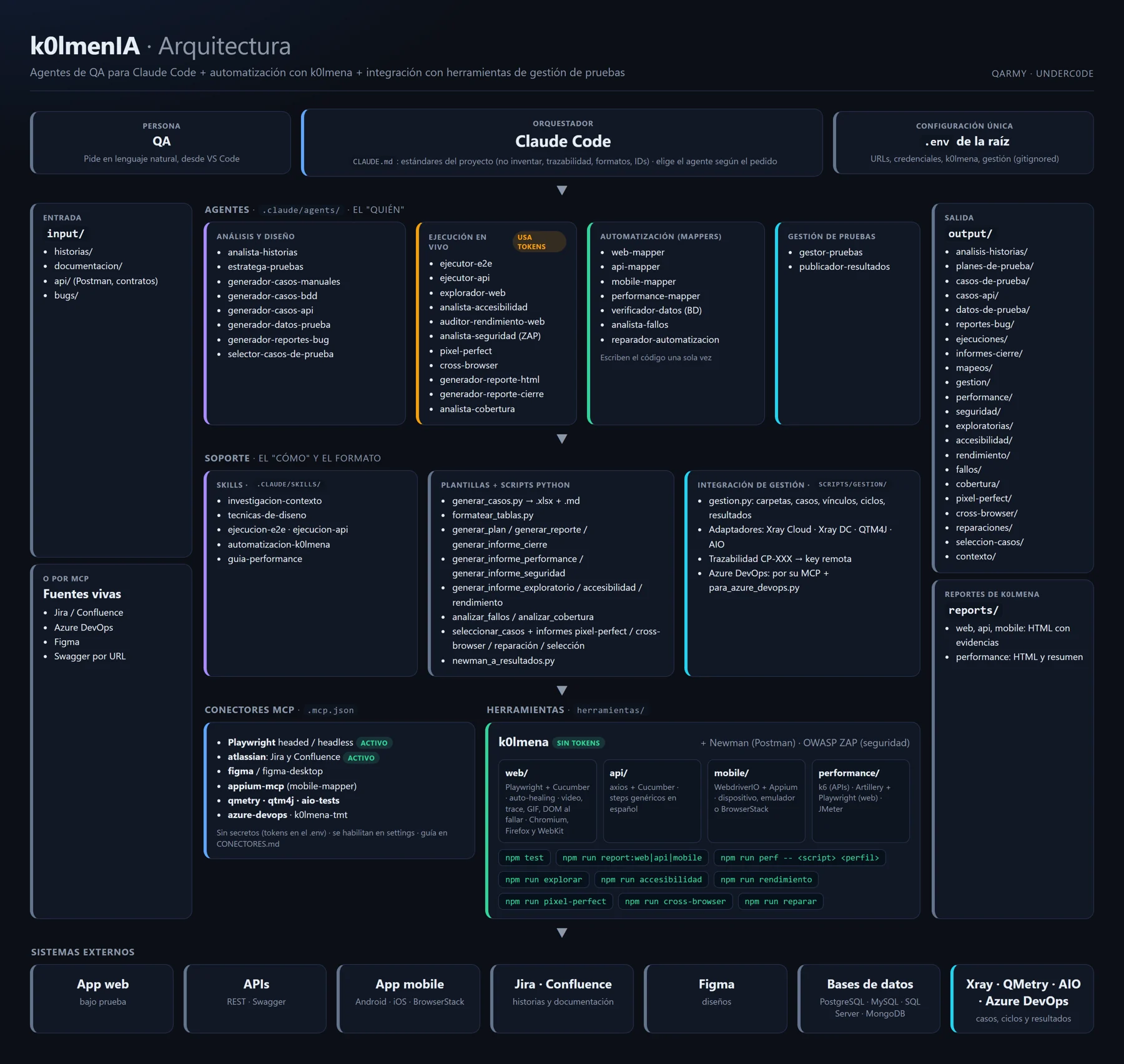
| Piece | What it is | Where |
|---|---|---|
| Claude Code | Orchestrator: interprets the request, picks the agent and applies project standards. | CLAUDE.md |
| Agents | The "who": one specialist per task. | .claude/agents/ |
| Skills | The "how": design techniques, E2E and API execution, k0lmena conventions. | .claude/skills/ |
| Templates and scripts | Output format and deterministic HTML reports. | plantillas/ · scripts/ |
| Management integration | gestion.py with adapters for Xray Cloud, Xray Server/DC, QTM4J and AIO Tests. | scripts/gestion/ |
| MCP connectors | Playwright and Atlassian active; Azure DevOps, Figma, Appium, QMetry, AIO Tests and k0lmenaTMT ready to enable. | .mcp.json |
| Tools | Newman for Postman and k0lmena for web, API, mobile and performance. | herramientas/ |
How to use it
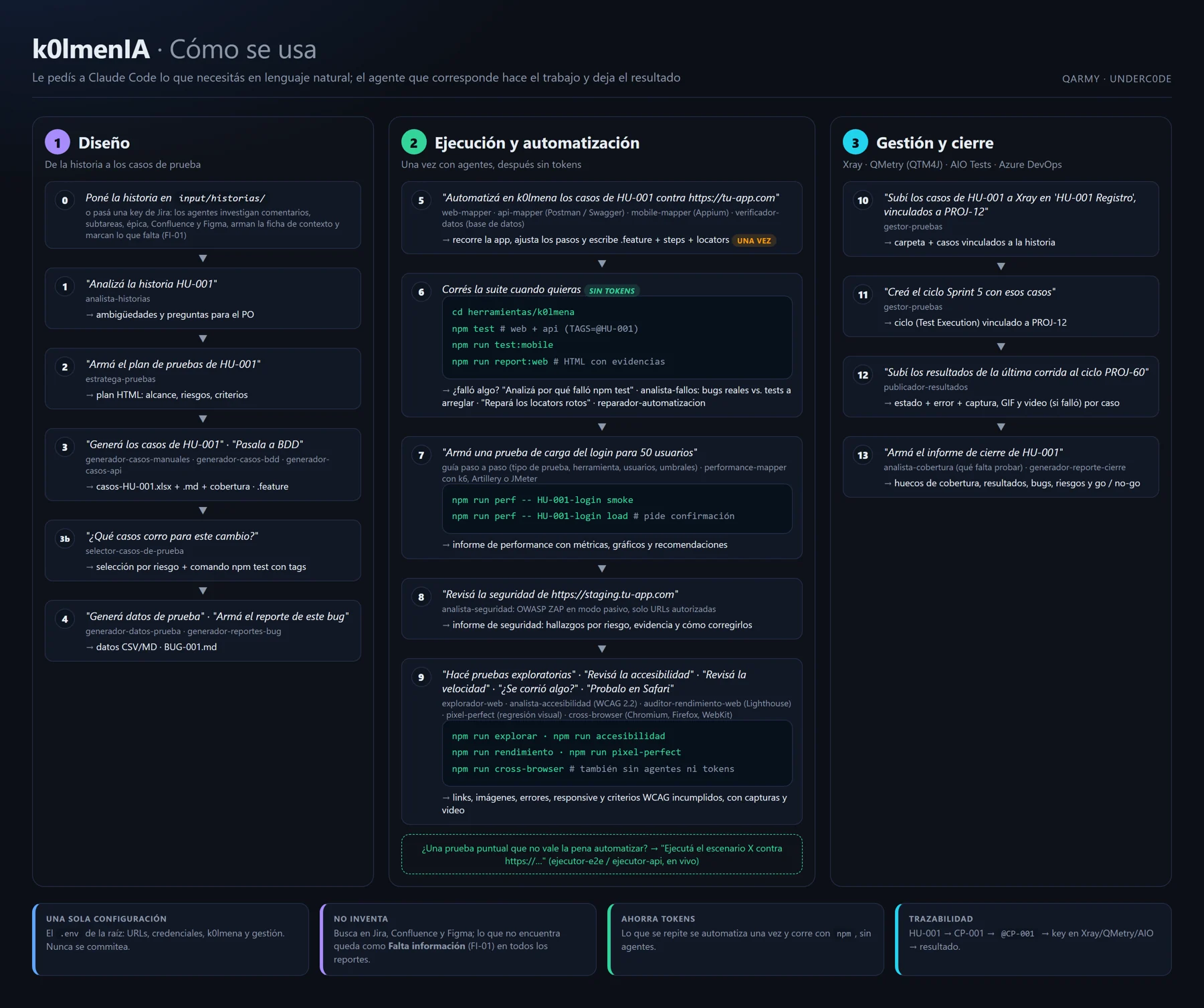
- Add your inputs in
input/, or pass a Jira key, a Confluence page or a Figma link with the connector enabled. - Ask in plain language. Claude Code picks the agent; you can also name it.
- Review the result in
output/orherramientas/k0lmena/. - Automate what repeats and run it with
npm testas often as you like, with zero tokens.
See the catalog of all 28 agents
Requirements
Install only what you'll use.
| For… | You need |
|---|---|
| Using the agents | Claude Code and a Claude account (Pro, Max, Team or Enterprise) or Anthropic API access. VS Code recommended. |
| Cases, reports and management | Python 3 with openpyxl, tabulate and requests. |
| Live E2E runs | Node.js 18+ and Playwright browsers. |
| Postman collections | Newman |
| Automating with k0lmena | Node.js 20+ |
| Mobile automation | Node.js 22+, JDK and Android SDK, or macOS with Xcode for iOS; or a BrowserStack account. |
Installation
1. Install Claude Code
curl -fsSL https://claude.ai/install.sh | bash    # macOS / Linux
npm install -g @anthropic-ai/claude-code          # alternative
claude --version
On Windows, follow the official guide.
2. Clone the repository
git clone https://github.com/underc0delabs/k0lmenIA.git
cd k0lmenIA
pip install -r requirements.txt     # Mac/Linux: pip3
npm install                         # k0lmena
cp .env.example .env                # and fill it in (PowerShell: copy)
3. Check everything is ready
npm run doctor # tells you what's missing and how to fix it4. Open VS Code and launch Claude Code
code .
claude      # asks you to sign in the first time
5. Add optional pieces
npx playwright install              # live E2E runs
npm install -g newman               # Postman
cd herramientas/k0lmena
npx playwright install chromium     # + firefox webkit (cross-browser)
npm run bootstrap:k6                # k6
npm run bootstrap:jmeter            # JMeter (Java 8+)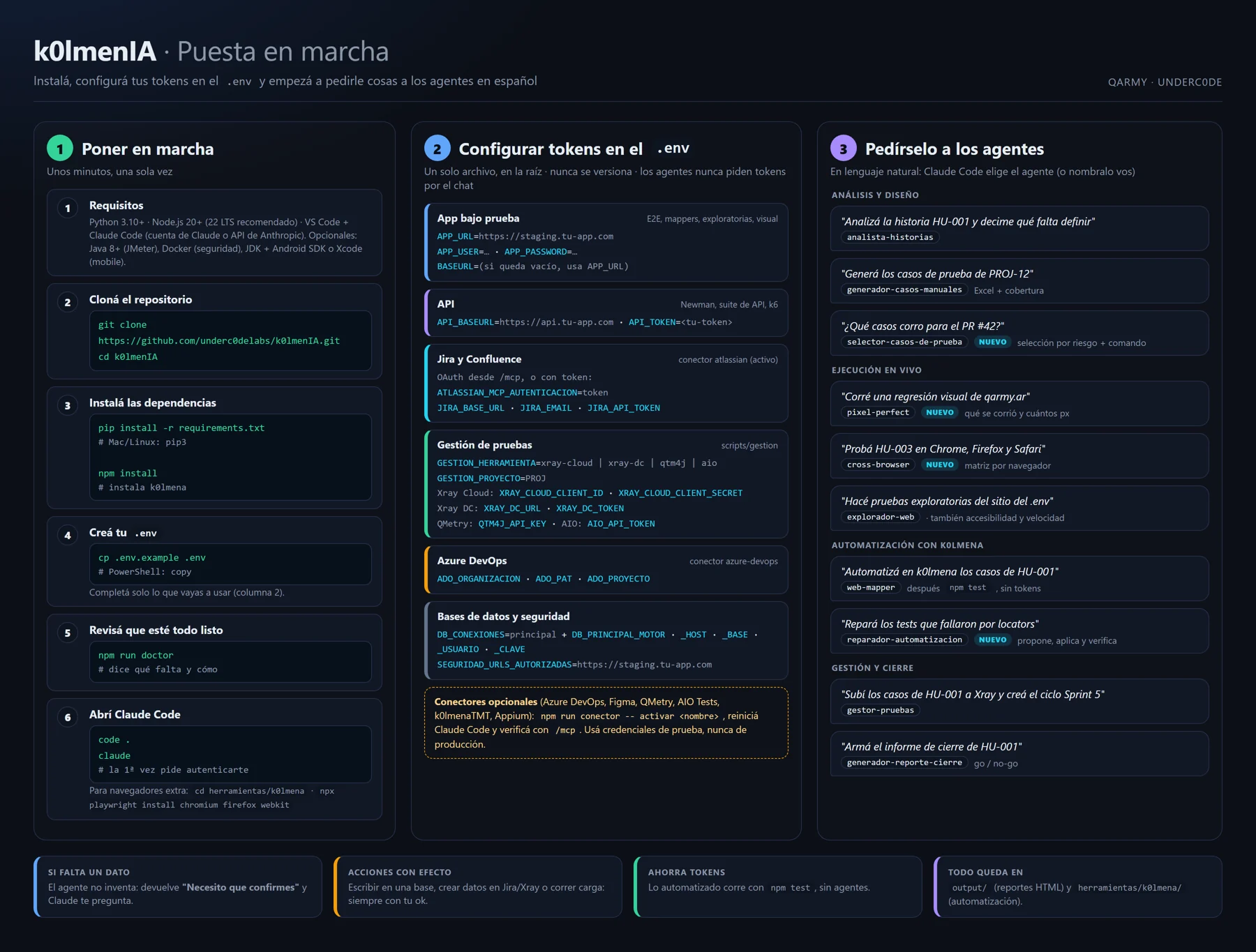
Configuration: the .env file
There is a single .env at the repo root, used by the agents, k0lmena and the management scripts. It is in .gitignore and the commented template is .env.example.
| Group | Variables | Purpose |
|---|---|---|
| App under test | APP_URL APP_USER APP_PASSWORD | E2E runs and logins |
| API | API_TOKEN API_BASEURL | Newman, API suite and k6 |
| Web | BASEURL BROWSER HEADLESS VIEWPORT_WIDTH VIEWPORT_HEIGHT LOCALE TIMEZONE | Web suite browser |
| Execution | TAGS PARALLEL | Which scenarios and how they run |
| Evidence | EVIDENCE VIDEO TRACE | What gets attached to the report |
| Auto-healing | K0LMENA_AUTO_HEALING | Recover broken locators |
| Mobile | MOBILE_TARGET MOBILE_PLATFORM MOBILE_DEVICE_NAME MOBILE_APP MOBILE_UDID BROWSERSTACK_* | Where the mobile suite runs |
| Performance | PERF_VUS PERF_DURACION | Override k6 script load |
| Databases | DB_CONEXIONES + DB_<NOMBRE>_* | Database verification |
| Management | GESTION_HERRAMIENTA GESTION_PROYECTO | Xray, QMetry and AIO Tests |
| Azure DevOps | ADO_ORGANIZACION ADO_PAT ADO_PROYECTO | Boards, Wiki and Test Plans |
Context research and "missing information"
Before analyzing, planning, writing cases or automating, agents research the story's full context: Jira description and criteria, every comment, subtasks, epic, linked issues, Confluence, Figma, contracts and the input/ folder. The result is a reusable context sheet in output/contexto/.
Every value not found in any source gets an ID (FI-01) with what's missing, where it was searched, what it affects and the question for the PO. The same ID travels to the case spreadsheet, the .feature files (@falta-info @FI-01 tags), reports and the closing report. The application is never used as a source of requirements.
Automation with k0lmena
The framework ships in herramientas/k0lmena/. A mapper agent walks through the app once and writes the automation; from then on the suite runs with npm, without agents and with zero tokens.
| Type | Engine | Mapper |
|---|---|---|
| Web | Playwright + Cucumber, video, trace, GIF and auto-healing | web-mapper |
| API | axios + Cucumber with generic steps | api-mapper |
| Mobile | WebdriverIO + Appium on device, emulator or BrowserStack | mobile-mapper |
| Performance | k6 for APIs, Artillery + Playwright for web flows, JMeter | performance-mapper |
cd herramientas/k0lmena
npm test                       # web + API
npm run test:web               # also: test:api · test:mobile · test:all
TAGS=@HU-001 npm test          # filter by tag
npm run report:web             # also: report:api · report:mobile
If a step can't be executed, the scenario is tagged @bloqueado with the reason and won't run until it's resolved.
Performance
The performance-mapper builds load, stress, soak and spike tests. It never uses defaults: it walks you through goal, tool, environment, users, ramp-up, duration and thresholds, and asks for confirmation before every loaded run.
npm run perf                             # lists scripts
npm run perf -- <script> smoke           # validates with minimal load
npm run perf -- <script> load            # target load (asks to confirm)
npm run perf -- <script> stress --confirmar| Profile | What it does |
|---|---|
smoke | Minimal load to validate the script. |
load | Ramps to target load, holds and ramps down. |
stress | 1x, 2x and 3x: finds the breaking point. |
soak | Sustained load: leaks and degradation. |
spike | Sudden spike and recovery. |
Xray, QMetry, AIO Tests and Azure DevOps
gestor-pruebas and publicador-resultados work with Xray Cloud, Xray Server/Data Center, QMetry for Jira (QTM4J) and AIO Tests using the same commands. Configure it in .env with GESTION_HERRAMIENTA (xray-cloud, xray-dc, qtm4j or aio) and GESTION_PROYECTO.
| Concept | Xray | QTM4J | AIO Tests |
|---|---|---|---|
| Case | Issue Test (Manual / Cucumber) | Test case | Classic / BDD |
| Cycle | Test Execution | Test cycle | Test cycle |
| Case ↔ story | Link "Test" | Requirement link | jiraRequirementIDs |
| Cycle ↔ story | Link "Relates" | Requirement link | jiraTaskIDs |
python scripts/gestion/gestion.py --dry-run carpeta --ruta "HU-001 Registro"
python scripts/gestion/gestion.py subir-casos --origen <casos.xlsx> --carpeta "HU-001 Registro" --historia PROJ-12 --traza HU-001
python scripts/gestion/gestion.py crear-ciclo --nombre "Sprint 5" --historia PROJ-12 --traza HU-001
python scripts/gestion/gestion.py publicar-resultados --ciclo PROJ-60 --resultados <resultados.json> --traza HU-001
Azure DevOps Test Plans integrates through its official MCP connector using ADO_ORGANIZACION, ADO_PAT and ADO_PROYECTO: agents read stories and the Wiki, and create Test Cases linked to a suite.
Database verification
The verificador-datos checks what was stored, in which state and with which values, in PostgreSQL, MySQL / MariaDB, SQL Server and MongoDB, with several named connections. It is read-only by default, masks sensitive data and requires explicit enabling and confirmation to write.
DB_CONEXIONES=principal,pagos
DB_PRINCIPAL_MOTOR=postgres        # postgres | mysql | mariadb | sqlserver | mongodb
DB_PRINCIPAL_HOST=localhost
DB_PRINCIPAL_PUERTO=5432
DB_PRINCIPAL_BASE=tienda
DB_PRINCIPAL_USUARIO=qa_lectura
DB_PRINCIPAL_ESCRITURA=no
DB_PRINCIPAL_PRODUCCION=no
Web quality: exploratory, accessibility, performance, visual, cross-browser and security
| Agent | What it checks | Agent-free command |
|---|---|---|
explorador-web | Broken links and images, JS and console errors, responsive at 5 resolutions and load times. | npm run explorar |
analista-accesibilidad | WCAG 2.2 with axe-core, keyboard, focus and 320px reflow. | npm run accesibilidad |
auditor-rendimiento-web | Lighthouse mobile and desktop, Core Web Vitals and opportunities. | npm run rendimiento |
pixel-perfect | Visual regression against a baseline or Figma design. | npm run pixel-perfect |
cross-browser | Chromium, Firefox and WebKit side by side. | npm run cross-browser |
analista-seguridad | Passive OWASP ZAP scan (authorized sites only). | python herramientas/zap/escanear.py |
MCP connectors
| Connector | Purpose | Auth |
|---|---|---|
playwright | Browser for the E2E runner and web-mapper. | Active |
atlassian | Jira and Confluence. | Active · OAuth or API token |
figma | Copy, states and components from a link. | OAuth |
appium-mcp | Used by the mobile-mapper. | ANDROID_HOME |
qmetry · qtm4j | Query QMetry from the chat. | API key |
aio-tests | Query AIO Tests from the chat. | Token |
azure-devops | Stories, Wiki and Test Plans. | PAT |
k0lmena-tmt | Load and query cases in k0lmena TMT. | Personal token |
npm run conector                          # lists available connectors
npm run conector -- activar azure-devops  # enables one (just for you)
Then restart Claude Code and check the connection with /mcp.
Conventions
| Item | Format |
|---|---|
| Stories | HU-001 |
| Acceptance criteria | CA1 · CA2 |
| Manual cases | CP-001 |
| API cases | CP-API-001 |
| Bugs | BUG-001 |
| Missing information | FI-01 · @falta-info @FI-01 |
| Where | Tags |
|---|---|
| Feature | @HU-001 @web · @api · @mobile |
| Scenario | @CP-001, @CP-API-001 and @smoke if critical |
| Exclude | @bloqueado |
Troubleshooting
I don't know what's missing
Run npm run doctor: it checks Python, Node, k0lmena, Playwright, Newman, Java, Docker, .env and connectors, and tells you how to fix what's missing.
An agent replies "I need you to confirm"
It's by design: subagents can't ask mid-task. Answer and Claude resumes with the same agent.
npm test runs 0 scenarios
You haven't automated anything yet (folders start empty) or the TAGS filter matches no scenario.
An MCP connector won't connect
Variables must be in the environment where you launch claude. Atlassian and Figma are authorized from /mcp.
See all troubleshooting entries in the full documentation
Extending the project
- Agent: a
.claude/agents/my-agent.mdfile withnameanddescription; Claude Code uses the description to decide when to call it. - Skill: a folder in
.claude/skills/with itsSKILL.md. - MCP connector: an entry in
.mcp.json, with no secrets. - Tool: a subfolder in
herramientas/with its README.
License
K0lmenIA is open source under the MIT license. Built by the QARMY and Underc0de community.
Want it in your team?
We install it, connect it to your tools and train your team.
Talk to us on WhatsApp